
 Download Beta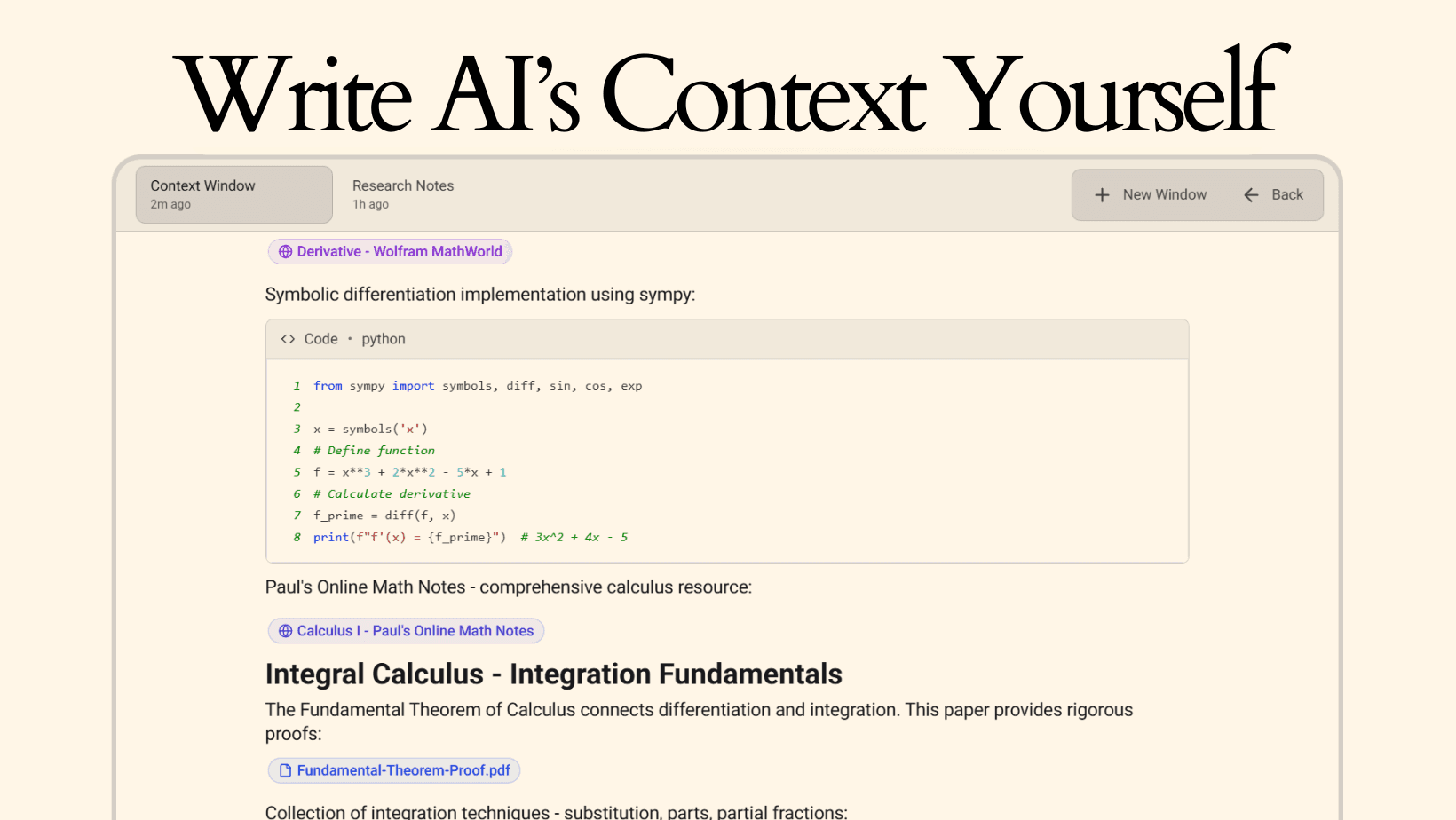
Context Windows
"Write AI's Context" Watch on YouTube →
"Write AI's Context" Watch on X →
Context Windows: Write AI's Context Yourself
The ultimate context handling. Build massive, rich knowledge bases.
Depth of Context
Most AI tools work with limited context. You can attach files and write prompts, but you're constrained by input size and the temporary nature of conversations. When you need to provide extensive background information, reference multiple sources, or maintain context across many conversations, current approaches fall short.
Your actual work involves complexity that doesn't fit neatly into prompts. Projects span dozens of documents. Research involves hundreds of sources. Development requires understanding entire codebases. The gap between what you need to convey and what you can easily provide limits how helpful AI can be.
Context Windows addresses this by letting you build extensive, persistent knowledge bases that AI can reference.
Context Windows
Context Windows are comprehensive, structured documents where you can combine text, files, media, code, and live integrations to create rich context for AI conversations. Think of them as personalized documentation or knowledge bases built specifically to give AI deep understanding of your work.
Unlike temporary chat contexts that disappear after conversations end, Context Windows persist. You build them once and reference them across unlimited conversations. Unlike simple file uploads, they support extensive writing, multiple content types, and sophisticated integrations.
The goal is to write article-level or documentation-level context comprehensive enough that AI truly understands your project, research area, or domain without requiring repeated explanations.
Core Capabilities
Context Windows support multiple content types and integrations designed for building extensive context.
Rich Text Writing: Write as much as you need with full formatting support. Use heading hierarchies to organize content. Create sections and subsections. Build structured documentation.
File Uploads: Upload PDFs, images, spreadsheets, code files, documents, presentations. Any file type that provides relevant context.
URL Integration: Attach web links with content extraction capabilities. Scrape full article text, documentation pages, or blog posts so the content becomes searchable within your context.
YouTube Videos: Embed videos with automatic transcript extraction. Convert video content into text that AI can reference.
Code Blocks: Write code examples with syntax highlighting across multiple languages. Include implementation examples, architecture snippets, or full functions.
Spotify Integration: Link playlists or tracks to provide creative context or thematic background.
X Posts: Embed individual posts or entire threads to reference discussions, announcements, or expert commentary.
Interactive Maps: Add locations with map embeds for geographic context office locations, project sites, research areas.
Browser Embeds: Embed live websites directly in your Context Window. Reference live documentation, dashboards, or tools without leaving your context.
Content Extraction: For URLs and videos, extract full content and insert it directly into your notes. Don't just link integrate the actual information.
Scaling Context
The real power of Context Windows emerges when building comprehensive context packages.
A research Context Window might include: Your 10,000-word analysis and notes, 15 uploaded academic papers, 30 scraped articles from relevant sources, 10 YouTube lectures with extracted transcripts, code examples demonstrating concepts, datasets for reference, embedded expert discussions from X, and geographic context for research locations.
A software project Context Window might contain: Complete architecture documentation, API reference materials, coding standards and style guides, uploaded codebase files, scraped documentation from frameworks you're using, YouTube tutorials relevant to your stack, code examples showing implementation patterns, team information and processes, client requirements documents, and project timeline details.
A learning curriculum Context Window could aggregate: Course materials from multiple sources, documentation for technologies you're learning, 100+ hours of tutorial transcripts, practice project repositories, code examples across different difficulty levels, articles explaining key concepts, Stack Overflow discussions about common problems, reference sheets and cheat sheets, your personal notes and insights, and solved challenge problems.
These aren't theoretical maximums users are building Context Windows at this scale because the system supports it.
Feeding AI
When you've built extensive context, you need control over what AI sees in specific conversations.
The Feed AI sidebar displays all content in your Context Window with toggles for each item. You can enable relevant sections and disable others based on what the current conversation needs.
For example, in a project context containing 50,000 words across multiple documents, you might enable only the technical architecture docs and API references for a development discussion, while keeping budget information and meeting notes disabled. For a client communication discussion, you'd switch which sections are active.
This selective feeding lets you maintain one comprehensive Context Window while using it for many different types of conversations, each with appropriate context depth.
Practical Applications
Context Windows serve different purposes across different work domains.
For software development, they function as living documentation. Maintain complete project context including architecture decisions, API specs, coding patterns, and technical constraints. When working on any part of the project, the full context is immediately available.
For research and academic work, they serve as knowledge aggregation tools. Compile all sources, notes, datasets, and analysis in one place. Build comprehensive literature reviews with the actual content, not just citations.
For project management, they provide single-source-of-truth documentation. Everything about a project requirements, timelines, stakeholders, communications, deliverables organized and accessible.
For content creation, they maintain brand and topic context. Store guidelines, previous work, audience research, and creative references. Generate new content with complete brand context already loaded.
For learning, they organize curriculum materials. Aggregate tutorials, documentation, examples, and practice problems into structured learning resources.
Privacy
When using local AI models through Ollama or hugging face, all context processing happens on your device. Your Context Windows never leave your computer.
When using cloud AI models, the Feed AI sidebar controls exactly what gets transmitted. You can select which context window notes you want to feed and which you don't.
Context and Data
Context Windows become infrastructure for your AI-assisted work. The time invested in building comprehensive context pays dividends across all future conversations.
A well-built project Context Window means never re-explaining your project. A thorough research Context Window means AI always has access to your complete literature review. A comprehensive learning Context Window means consistent educational assistance.
The more complete your Context Windows, the more useful AI assistance becomes. You're not just taking notes you're building the foundation that makes AI genuinely helpful for your specific work.
Context Windows enable comprehensive AI context through persistent, structured knowledge bases. Build once, reference forever.
It's like you're writing AI's database yourself.